How to Limit Model Call Frequency
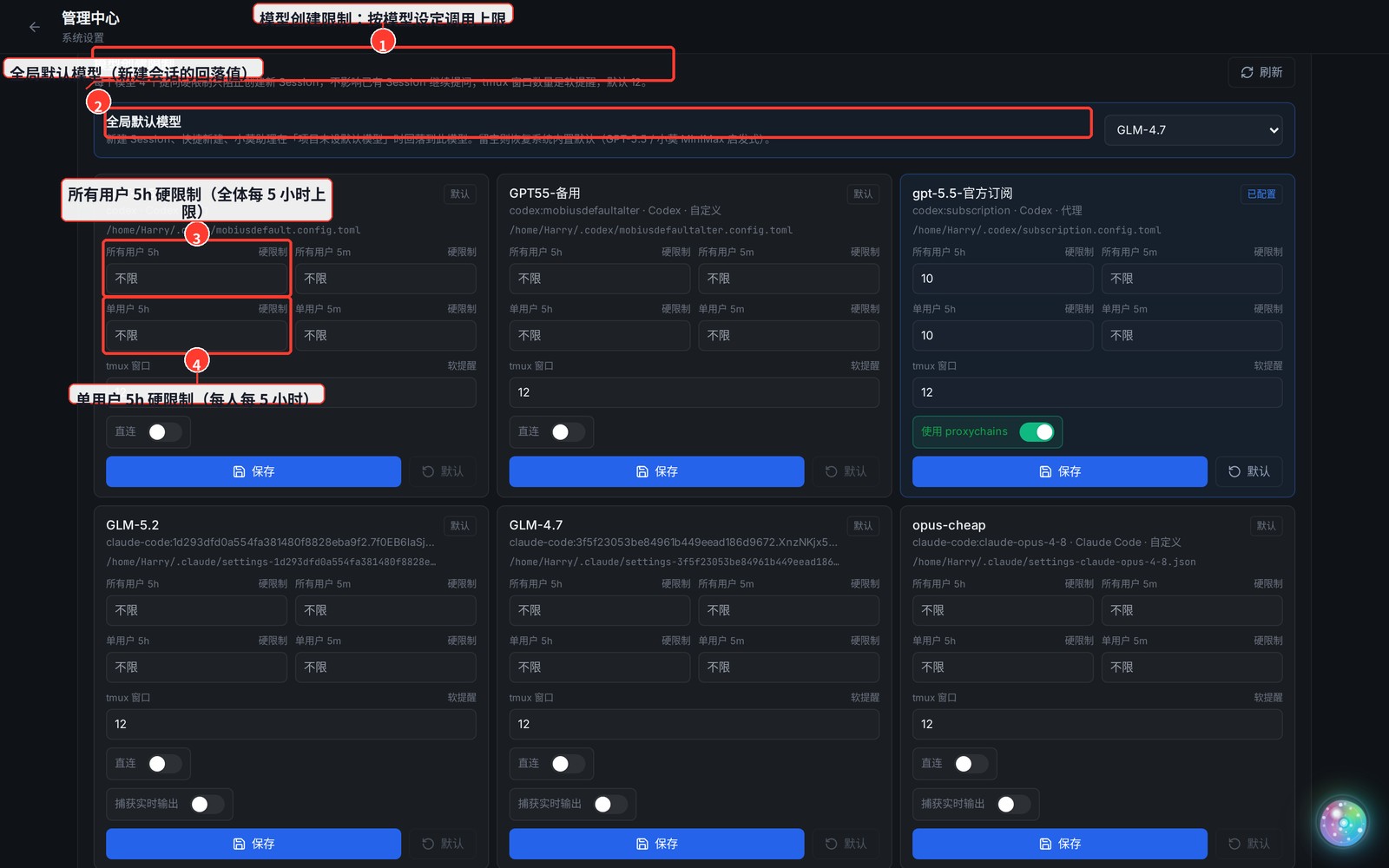
Under Admin Center → System Settings → Model Creation Limits, you can set per-model call ceilings to stop any single model from being run up by one user or by everyone.
1. Open "Model Creation Limits"
- Top-right avatar menu → Admin Center → the System Settings tab → find the Model Creation Limits card.
2. Two Kinds of Settings
- Global default model: the fallback model for a new session when the project has no default and the user hasn't picked one.
- Four hard limits per model (blank = unlimited):
- All users / 5h — combined, all users get at most N calls per 5 hours
- All users / 5m — combined, all users get at most N calls per 5 minutes (guards against bursts)
- Per user / 5h — each user gets at most N calls per 5 hours
- Per user / 5m — each user gets at most N calls per 5 minutes
3. What Happens When a Limit Is Hit
- Once you hit a model's ceiling, it becomes disabled (red) in the model picker (hover to see remaining / limit).
- 5-minute limits auto-recover when the window rolls over; 5-hour limits wait for the next 5-hour window.
- Click Save after editing — it takes effect immediately, no restart needed.