How to Migrate Skills & Memory (Skill & Memory Management)
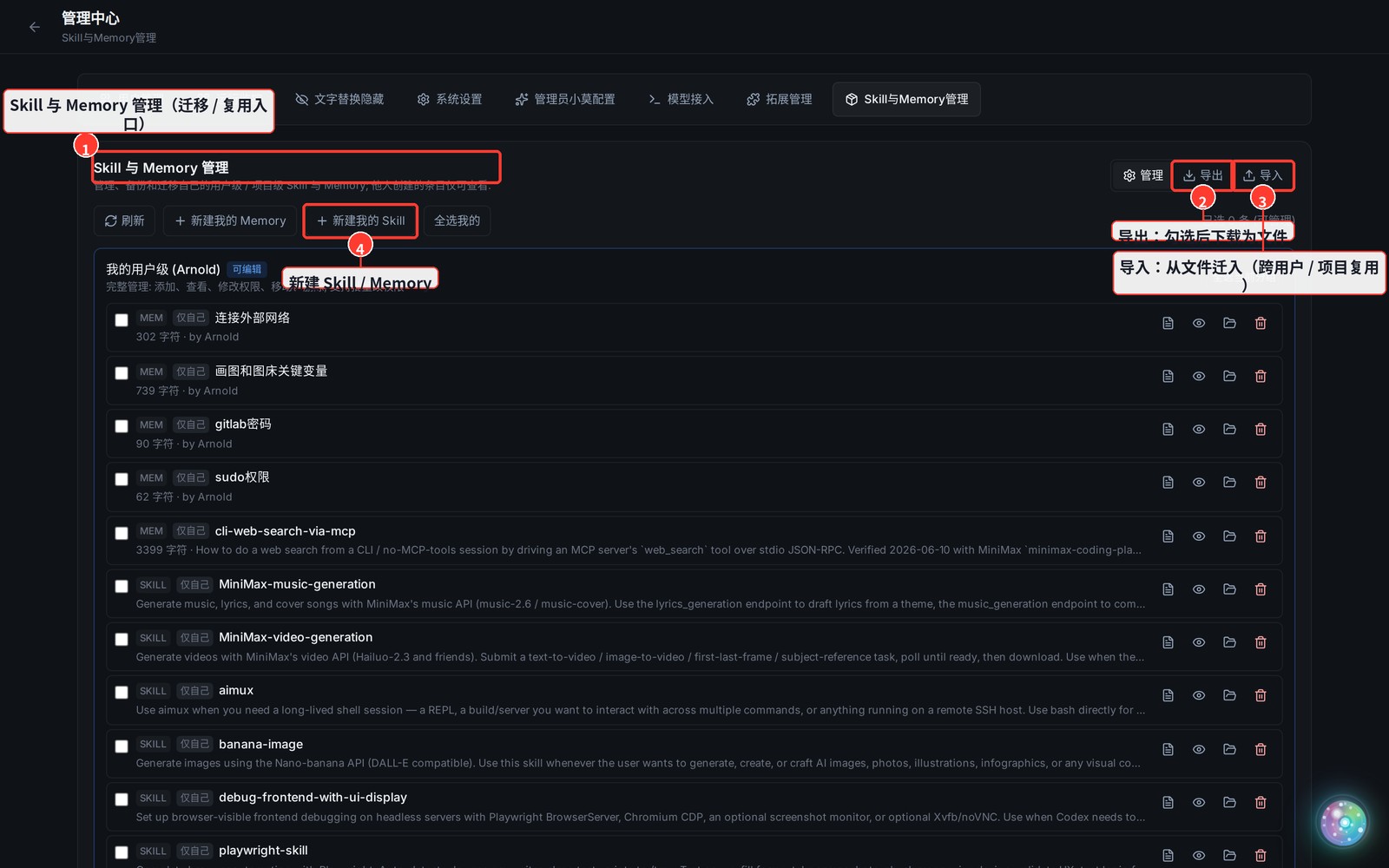
Skills and Memory can be reused across users and projects: export them to a file under Admin Center → Skill & Memory Management, then import them elsewhere. You can also create new ones directly.
1. Open "Skill & Memory Management"
- Top-right avatar menu → Admin Center → the Skill & Memory Management tab.
2. Export (migrate out)
- Tick the Skills / Memory you want to migrate in the list (use "select all mine / select group" to batch-select).
- Click Export at the top right to download a file.
3. Import (migrate in)
- Open the same panel in the target account / target project, click Import, and upload the file you just downloaded.
- If a same-named entry already exists, choose to overwrite or skip as prompted.
4. More
- New my Skill / Memory creates a user-level (all-projects) Skill or Memory directly.
- For the three levels of Skills / Memory (built-in / user-level / project-level) and everyday usage, see Use Skills & Memory.